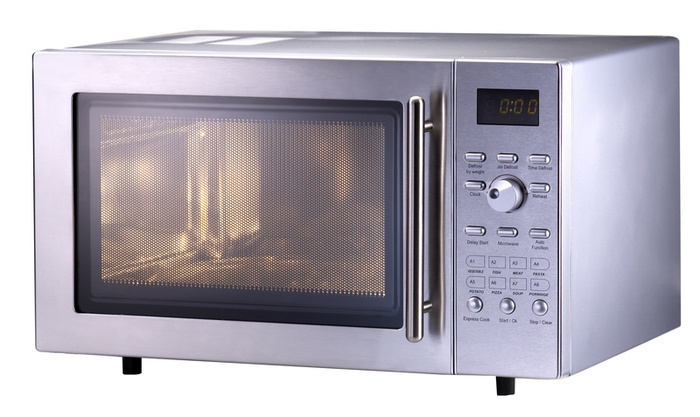
Solution: Check the voltage at the outlet supplying power. If it is lower than 115 volts, there is a problem with your electrical
service or breaker. A bad turntable motor may also be the cause. To
check it, turn the microwave over onto its top. Remove the bottom grill.
Set the VOM to RX1 and remove one lead from the motor terminals. Probe
the terminals. If the reading is infinity, then replace the motor. The
magnetron and the wave guide may also be the culprits here. They need
to be serviced by a professional.
HOW TO GET TV REPAIR RED GREEN BLUE PIXEL DOT IN LCD TV SCREEN FIXED,
THIS IS COVERED UNDER WARRANTY OR TV RECALL SO CALL 1-800-SAMSUNG OR GO
TO TAMPATEC.BLOGSPOT TO GET OTHER TECH SUPPORT NUMBERS, DON'T OPEN TV
UNTIL YOU TALK TO TV COMPANY 1ST THEY MAY FIX IT FOR FREE.
video by: Tampatec
"Multimeter" Best easy safe way how to test power supply volts on TV
board troubleshooting guide using dvm digital meters reading testing
voltages, to get TV boards check out http://tv-part.com/ "troubleshooting guide" "common fails"
check out my other videos on "how to" fix Vizio, samsung, sony, emerson, lg Flat screen TVs
Also
check out how to test for bad capacitors, resistors, diodes,
transistors on my Tampatec channel Please Subscribe for more tech video
reviews and Free tech support!
model 5265 Samsung LCD TV repair - turns on and off repeatedly common repair (my 1st youtube video) get capacitors 1000uf 10v kits "I Buy My TV Repair Parts Here" http://tv-part.com/ 1000UF 10V save $200-400 repair clicking repeats clicks then after 5 minutes might turn on then tiny colors purple pixels dots cover the flat screen. this is still covered by samsung warranty under a usa lawsuit (1-800-726-7864) free fix by tech service warranty if you go to Tampatec.blogspot.com You can Call Samsung Warranty service center & other TV companies too even if Your TV is Over 1 Year old you May get a Free Fix!!!
Common ln lnt LCD Plasma HDTV repair Clicking Red Blinking Led light,
easy common fix power supply board repaired steps to repair "I Buy My TV
Repair Parts Here" http://bit.ly/shopjimmy Philips Magnavox & SAMSUNG model plasma tv repair video tutorial, dead no power Review
EASY HOW TO FIX LG plasma TV - color bars
Diy HDTV Plasma tv repair. tv reparar the red green blue color stripe
line vertical bars T- control t-con timing controller boards LG fijar
reparar TV I Buy My TV Repair Parts Here: http://tv-part.com/
video by: Tampatec
powersupply Common problems & solutions to fix TV power issues, How
to test troubleshoot Sony power supply repair help service video
tutorial review, learn circuit testing
video by: Tampatec
LG 42PG20 bad capacitors 3300uf 10v get TV
parts at http://tv-part.com/
"blinking red light" "flashing red light" ,
como cómo Servicio de reparación de televisores,
EASY COMMON FIX LG
PLASMA TV - NO POWER,
this is "common Fix for LCD and Plasma" TV repairs
clicking and "no power"
dead Flat screens. "TV FAILS" randomly "on and
off"
WHAT BOARDS COMMONLY GO BAD IN FLAT SCREEN PLASMA TV POWER SUPPLY Y-SUS
BOARDS X-SUS BOARDS BUFFER BOARDS MAIN VIDEO LOGIC BOARDS "ELECTRONIC
REPAIRS" TV REPAIR VIDEO TUTORIAL GUIDE KNOWING WHAT BOARDS ARE IN A
PLASMA TV BEFORE FIXING IT. HD TV HDTV SAMSUNG SONY LG PANASONIC
FLAT-SCREENS, SOME PLASMA PANELS DO BREAK OR CRACK WHICH IS NOT
REPAIRABLE.
How to Call, Text, download & install More Top Best Pebble Watch
Apps and Games review, Top smartwatches out are Android Sony Smartwatch 2
aka SW2, Samsung Galaxy Gear only for Samsung devices,
Qualcomm Toq
Smartwatch for Android Smartphone, Pebble Steel for both Android and
Apple iOS Phones, rumors of Apples will release their iwatch around
Holiday season November or December. Battery life Lasts the longest is
Pebble E-paper smartwatch 5 to 7 days before charging then Toq watches
battery lasts 3 to 5 days cause it uses reflective mirrors then Sony SW2
battery 3 to 4 days and lastly is Samsung Gear lasting just over 1 day,
Pebble is the Cheapest of all of the smartwatches & works like a
Kindle so it's easy to use. #HowtoSmartwatch Reviewed Pebbledialer, Pebble Glance app, Musicboss, Pebble Rocker, top clock watchfaces.
Now that we see a great many surface mounted components being used in
modern day TVs many repairmen are so intimidated they may forget there
are still a great many serviceable components and circuits, Especially
the switch mode power supply. Here are a few ebooks I thought were very
helpful.
How to troubleshoot and repair Switch Mode Power supplies by Jestine Yong at http://davestv.jestinemichellepow.cli...
This was an expensive ebook but the best I have ever read on switching
power supplies.Jestine is good at getting right to the main points you
need to understand about troubleshooting this kind of power supply and
their associated feedback circuits. Since a majority of the problems I
have seen on LCD TVs are related to bad power supplies this is one book
I'm glad to have in my collection. Most of the book was easy reading
with plenty of pictures and diagrams. ======================================== Testing electronic components and finding unknown resistor values by Jestine Yong. http://5d8388ioop4nfm862d1b0u7sbj.hop... This
is an excellent book for A beginner level student who wants to learn
how to test electronic components like a professional. Jestine really
took the time to make this book easy to understand. ======================================== How to repair LCD Computer Monitors by Jestine Yong at http://davestv.jestinewilliamlcd.clic... Even
though this book was about computer monitor repair I found most of the
troubleshooting techniques he demonstrates also applied to LCD TV repair
so I was glad to have read it. Much like the book on Switch Mode Power
Supplies it was easy to read and had lots of pictures and good
troubleshooting techniques. ======================================== Mikes TV case histories The latest paperback edition has hundreds of case histories on LCD, CRT, Plasma and Projection TVs. at http://www.mikestvtips.com/ 1-410-272-4984 When
I first started in the TV repair business and my troubleshooting skills
were not that great often times Mike's case histories told me exactly
which parts I needed to replace and it often saved me from having to
purchase a great many schematics. I have been using his case histories
since 1995 and I would not be with out them. If you call him please be
considerate of his time zone and call between 11:00 AM TO 8:PM Eastern
time only. ======================================== Getting Started In Electronics by Forest Mims available at some Radio Shacks or through this link. http://www.Forrestmims.com If
you know nothing at all about electronics and want to start with the
basics this is a fantastic book to start with. This book is packed with
pictures.
Mitsubishi 276P595010 DLP Chip Replacement for DLP TV RepairHow to Replace DLP Chip in Mitsubishi TV Repair TutorialBe sure to unplug your TV before starting any repairs.Unscrew and remove the bottom panel from the back of your TV.Remove all cables from the light engine.Take care not to use excessive force when removing cables.Exact locations of cables will vary depending on TV.Remove the screws holding the light engine in place.Carefully remove the light engine from the TV.Remove the lens shroud by removing the corresponding screws.Take care not to touch the lens.Remove all cables from the DMD board.Remove the DMD board housing screws.Remove the back half of DMD board housing from the bottom.Remove the DMD board screws.Make sure to support the board as you remove the final screws.Remove the DMD board from the light engine.Release the DLP chip heatsink by removing the corresponding screws.Remove the heatsink.Remove any remaining DMD board screws.Remove the DMD board from the front housing.Unlock and remove the DLP chip from the DMD board.Before installing the new DLP chip, please verify that it is equivalent in appearance to the original DLP chip,and that all part numbers are compatible.Compatible part numbers are listed on all relative ShopJimmy product pages.Remove all fingerprints and dust from the glass surface with a clean microfiber cloth.Install and lock your new DLP chip.Reinstall the DMD board into the front half of the housing.Reinstall the DLP chip heatsink.Reinstall DMD board onto the light engine.Reinstall the back half of the DMD board housing.Reinstall all DMD board cables on the lens side.Take care not to damage any cables when reinstalling.Reinstall the lens shroud.Before reinstalling the light engine into your tv,please take a moment to verify all surfaces especially near the lens are clean and free of dust.Carefully place the light engine back into the TVand secure it with the corresponding screws along the bottom.Reinstall all light engine cables.Take care not to damage any cables when reinstalling.Reinstall the bottom panel on the back of your TV.Your ShopJimmy replacement DLP chip does not need any manual configuration in order to function properly.Simply plug in your TV.wait for the green status light to stop blinking, power on,and your TV will function as if new.Should you notice a slight distortion to the angle of your picture along the edges,please check to make sure that your light engine and DMD board are flush and secure within their housings.